

We had an application running on Payara application server for over a year. The application was running quite stable without any problem. One day, users report that they encountered HTTP error 431 when visiting the login page of the application. The problem just happened suddenly. It probably happened when redirecting users to Okta SSO server. We are going to explain the process of solving the problem in this post.

What are some common causes of HTTP error 431?
HTTP error 431, also known as “Request Header Fields Too Large”, is typically caused by the client sending a request with header fields that exceed the server’s configured or default limits. Some common causes of HTTP error 431 include:
- Large cookies: If the client includes a cookie in the request header that is too large, it can trigger an HTTP 431 error. Cookies are often used to store session information or user preferences, and if they contain a significant amount of data, they can exceed the server’s header size limits.
- Long URL or query parameters: If the URL of the request or the query parameters attached to it are too long, they can result in an HTTP 431 error. Servers impose limits on the maximum length of URLs or query parameters to prevent abuse or resource exhaustion.
- Excessive headers: If the client includes a large number of header fields in the request, it can cause the total size of the headers to surpass the server’s limits. This can occur if the client includes numerous custom headers, proxy-related headers, or other header fields in the request.
- Proxy or load balancer limitations: In some cases, the HTTP 431 error may be caused by an intermediary proxy server or load balancer that imposes its own header size limits. These intermediate entities may have different configuration settings compared to the origin server, resulting in the rejection of large request headers.
- Server misconfiguration: It’s possible for the server to be misconfigured with overly restrictive limits on request header sizes. In such cases, even requests with relatively small headers can trigger an HTTP 431 error. This can happen if the server administrator sets very low values for header size limits or if there are unintended errors in the server configuration.
The process of solving HTTP error 431
Here are the summary of the process of solving HTTP error 431:
- Identify the root cause
- Adjust server configuration
- Restart Payara application server
- Verify the fix
It is the most important and difficult step in the process of solving HTTP error 431. Understanding the underlying root cause of the HTTP error 431 is essential for effectively resolving the problem. By identifying the root cause, we can implement the necessary changes or fixes to prevent the error from recurring in the future.
There is no universal method of identify the root cause of all problems. Different problems require different approaches to determine their underlying causes. A one-fits-all solution does not exist for all issues that may arise. Not all problems have pre-existing solutions readily available. In certain situations, you may be the first person to face a particular problem, requiring you to rely on your own problem-solving abilities to come up with a solution. In our experience, we reply on the following 3 values for solving all kinds of technical problems:
- Evidence (or error messages)
- When encountering a technical problem, one valuable resource is the evidence available, such as error messages or any other relevant information. Error messages often provide insights into what went wrong and can guide you towards identifying the root cause. By carefully analyzing the evidence at hand, you can gain a better understanding of the problem and work towards finding a solution.
- Past experiences
- Drawing upon past experiences can be a valuable asset when faced with technical problems. By reflecting on similar issues you have encountered in the past and the approaches you took to resolve them, you can leverage your previous knowledge and apply it to the current problem. Past experiences provide a foundation of understanding and can guide you in finding potential solutions or troubleshooting steps.
- Patience
- Problem-solving often requires patience, especially when dealing with complex technical issues. It may take time to investigate and analyze the problem thoroughly. Rushing through the process can lead to overlooking crucial details or implementing ineffective solutions. Patience allows you to approach the problem with a calm and focused mindset, enabling you to explore different possibilities systematically and arrive at a more accurate and effective solution.
The actual problem solving process
It took time to identify the root cause of HTTP error 431. Our system support colleague simply restarted Payara application server as a short-term workaround solution. But it really didn’t solve the problem. It happened everyday morning. We needed to restart Payara application server once a day.
We also tried to clear client browser cache as another workaround solution. But it still could not solve the HTTP error 431. Therefore, the problem was unlikely related to browser cookies.
Then, we checked the web access log to find out which web page was being access at the time of HTTP error 431 happened. Here is a command line example for finding 431 error code in web access log:
$ grep 431 server_access_logHowever, we could not find error 431 in web access log. In fact, none of all the web pages had been access. That is, the client requests never reached the software application. Therefore, we could confirmed that the problem was very unlikely caused by the software application.
The rest of the possible root cause would be either Okta or Payara application server. We found a document of Okta that discussed HTTP error 431. However, it was not helpful. Moreover, Okta was a 3rd party SSO service which was out of our control. We could only focus on Payara application server. Obviously, changing the value of HTTP Header Buffer Length in Payara was the top possible solution which was the popular solution we could find in the Internet.
We had used the default Header Buffer Length value, i.e., 8192 or 8KB, since initial installation of Payara application server. You can find Header Buffer Length via Payara admin panel shown as below:

We changed the Header Buffer Length to 16KB but HTTP error 431 still happened. We then changed it to 32KB. Unfortunately, the problem still happened. It’s the last resort we could use. It also means that we might encountered a problem that no one else did.
In this case, we could only reply on our patience to figure out the root cause and to find out a solution. Sometimes, we have to use some stupid methods. What we did is manually monitoring the web access log in real time. We simply used tail command:
$ tail -f server_access_logStupid method is not really stupid at all. After a half day monitoring, we surprisingly found that some client requests could still reach the application and were recorded by the web access log after HTTP error 431 happened. All those requests used HTTP/1.1 protocol. Normal requests going through modern web browsers used HTTP/2 protocol. HTTP error 431 might only happen when using HTTP/2 protocol.
In order to prove the finding, we executed the following commands in another machine:
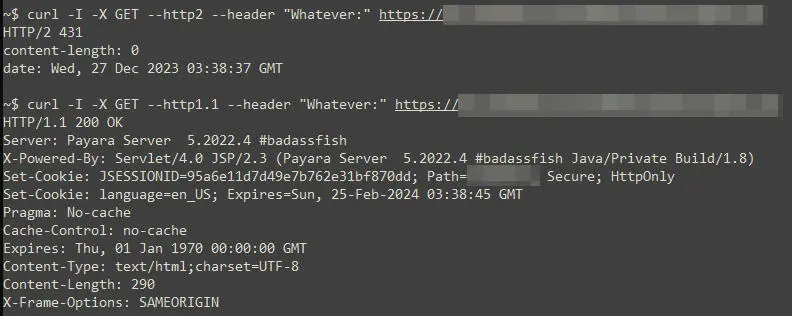
We repeated the above commands many times and got the same result. Therefore, HTTP error 431 only happened when using HTTP/2 protocol.
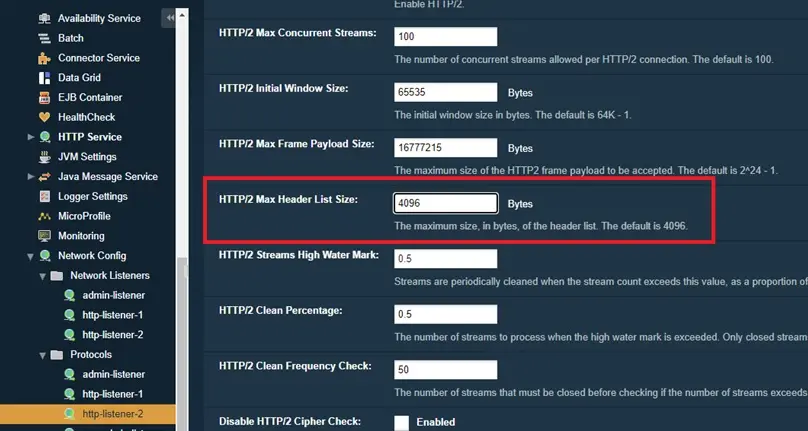
Based on the above finding, we could focus on only configuration parameters of HTTP/2 in Payara application server. We simply changed the value of HTTP/2 Max Header List Size from 4KB (default) to 32KB. HTTP error 431 magically disappeared.
It’s important to note that problem-solving is a dynamic process, and adaptability is key. Different situations may require additional approaches or resources beyond our imagination, and flexibility in your problem-solving approach is essential.
Comments are closed.